Last checked: October 8, 2026. Suno announced Speech beta on October 1, 2026: spoken audio combined with generated background music. VoiceAI Free offers a different alternative: create or import narration, supply your own licensed music, then mix and export locally. We do not call Suno's model or generate its soundtrack.
Which workflow are you looking for?
Choose Suno's official service when you want a model to create speech and a musical setting together. Choose the local voice and music mixer when you already have a cleared music track and want explicit control over its level and duration. Those results should not be presented as equivalent model outputs.
Local assembly gives you separate controls
Import a voice file or generate a short English passage with the site's local AI engine. Add music that you are permitted to use, keep it quieter than narration and choose whether a short track should loop. The mixer provides music fades and a stereo WAV preview. Output length follows the narrator. It does not rewrite a soundtrack around a dramatic delivery or automatically remove distracting instruments.
A two-track workflow can be useful when the script needs frequent corrections. Change the voiceover without asking a music generator to remake the entire piece. Keep the music file and its license record. For a complicated scene, an audio editor remains the better choice: the browser tool has no multitrack timeline, automation lanes or broadcast loudness meter.
Privacy and device cost
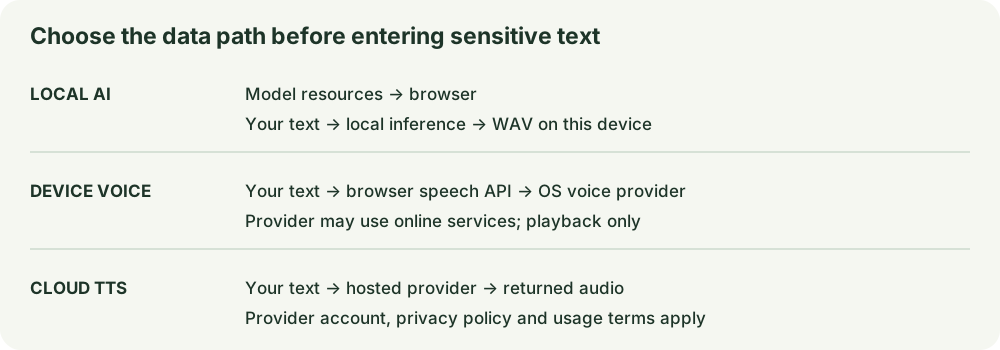
Suno's hosted service is governed by its own privacy and account conditions. Local mixing decodes supplied files in the tab and does not upload their contents to this site. Optional local AI speech first downloads a model and supporting files. A compressed music file expands in memory when decoded, so mobile devices may need a shorter scene. The mixer limits narration to two minutes and each source file to 20 MB.
Free does not settle publication rights
Confirm Suno's current plan conditions for generated material on its official pages. For local assembly, verify the music license, narration voice and source script separately. A track described as royalty-free may still require attribution or exclude paid advertising. Do not assume that mixing two files clears either file. This comparison makes no blanket commercial-use claim.
A safe first comparison
Use an original four-sentence script and a track you own. Save the resulting file, note the workflow and listen for speech intelligibility. Check that the final words are not cut off and that a loop does not create an audible jump. Compare editing effort and rights requirements, not an invented score. This article contains no controlled Suno-versus-Kokoro benchmark.
FAQ
Is VoiceAI Free a Suno Speech generator?
No. It creates local English speech with Kokoro and mixes supplied music with Web Audio.
Can it compose background music?
No. Supply a permitted track; composition remains outside this tool.
Do I need an account to mix?
No. File processing and preview run in the browser. Save your WAV before closing the tab.
Sources and disclosure
Suno's Speech beta announcement and Suno help center. These links earn no affiliate commission. Access and publication rights can change.