Text to Speech with Background Music — Local WAV
Mix a short local English voiceover or narration file with your licensed music. Adjust levels, looping and fades; preview and download stereo WAV.
Mix your narration and music locally
Choose a voice file, or generate a short English script with Heart. Import only music you own or may use. Nothing is uploaded.
The eight-second demo phrase is generated by this site, not licensed music from another provider. It is available for this demo without attribution.
Source audio is decoded on this device. Unsupported formats may fail.
Voice plus music, without a cloud upload
This tool combines two existing audio tracks with the Web Audio API. It can generate a short English voice with the same local Kokoro model as the home page, or use a narration file you supply. It does not compose music, clone a voice or imitate Suno Speech. Bring a music track whose license covers your intended distribution.
Set up a clear mix
Start with the narration around 0.8 and music around 0.15, then listen at a normal volume. These are starting controls, not measured loudness targets. Use a quiet passage and a loud passage from the narration. If consonants disappear under the soundtrack, lower music first. A louder master is not a clearer voiceover.
The output ends with the narration. Short music can loop; disable looping to let it end naturally. Fade applies to music only, with its duration capped at half the narration length. The narrator remains unchanged. This tool does not perform automatic ducking, loudness normalization or beat-aligned editing. Use a dedicated editor for complex scenes or broadcast delivery specifications.
File and device limits
Each file must be under 20 MB. Narration is limited to two minutes; music to ten minutes. Decoded audio consumes more memory than a compressed MP3, so a small file can still require considerable RAM. The WAV exports stereo 44.1 kHz, 16-bit PCM. A long source is rejected rather than silently truncated. If the browser cannot decode a format, convert a copy to a standard WAV or MP3 in an editor you trust.
Privacy and rights
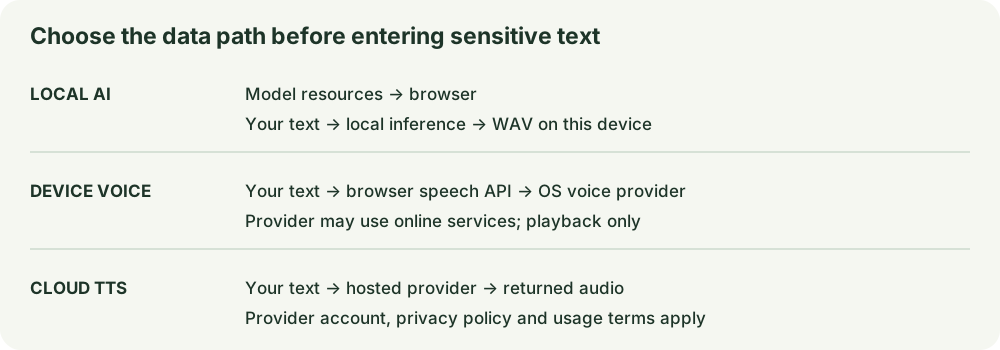
File contents, file names and text are not included in analytics and are not uploaded to this site's server. Model resources download from third-party hosts when local speech is needed. The mix exists in the tab until you save it. Clearing the result revokes its temporary link, not the original files. Reloading loses unsaved audio.
Music licenses can distinguish personal listening, monetized videos, paid advertising and client delivery. Check attribution, territories and any redistribution restriction. Technical access to a track does not establish permission. You also need rights to the narration and script. This site makes no universal commercial-use promise.
Questions about mixing
Why did my music stop early?
The output length follows narration. Enable Loop to repeat shorter music, or choose a track long enough for the scene.
Why are peaks clipped?
The summed tracks exceed the available amplitude. Lower one or both levels and render again; clipping is detected and reported.
Is this an AI music generator?
No. It mixes supplied audio with optional local English speech. No Suno or other cloud music model is called.
Continue your workflow